Client work,
never late.
Workdue is a calendar first work tracker for people who juggle many clients. Plan the week, capture tasks in seconds and get nudged before anything slips.
Free while in early access. No email needed.
Everything you need. Nothing you do not.
No setup marathon, no bloated menus. The essentials for running many clients, built to be fast.
A week you can actually see
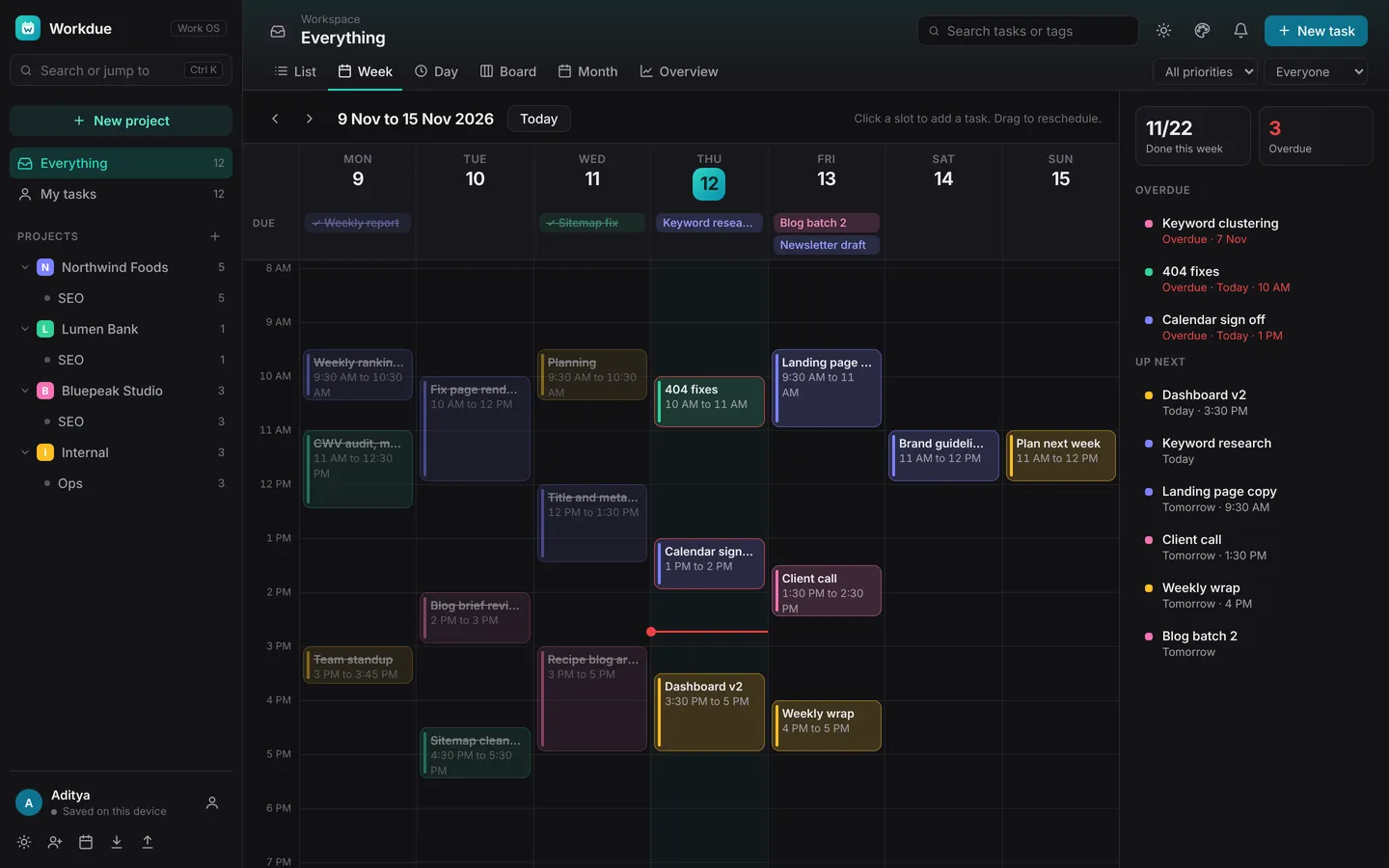
Tasks become time blocks next to their due dates. Drag to reschedule, spot clashes, and watch the now line move through your day.
Command bar
Press Ctrl K to create, search, jump and run any command.
Reminders that reach you
A daily summary plus a pop up before every due time, on laptop and phone.
A project for every client
Add a website, or let Workdue guess it, and the logo appears. Colours carry into the calendar.
Synced and offline ready
Saved to your account, cached on your device. Works on a train with no signal.
Six views, one workspace
List, Week, Day, Board, Month and Overview. Switch with the number keys 1 to 6.
Type it like you say it
Smart dates turn Send report fri 4pm !high into a task with date, time and priority. Export to Outlook or Google too.
Never miss a deadline again.
Workdue keeps an eye on the calendar for you. Tasks land on the right day, move with a drag, and nudge you before they are due.
- Morning summary of what is due and overdue
- Pop ups before each due time, on desktop and phone
- Overdue nudges with Move to today, Mark done and Snooze
- Drag a task to another day or hour to reschedule it
- Export to Outlook or Google Calendar
Set up in two minutes.
Add your clients
Create a project per client with its website. Logos and colours keep everything recognisable at a glance.
Capture tasks fast
Press Ctrl K and type Call client tomorrow 3pm. Date and time fill in automatically.
Plan and get reminded
Drag tasks into your week, switch on reminders and export to your office calendar.
Your hands never leave the keys.

“After five years in SEO and digital marketing, juggling deadlines for many clients at once, I wanted one place that showed my whole week and nudged me before anything slipped. So I built it.”
Questions, answered.
Is Workdue free?
Yes. Workdue is free while in early access. Create an account with a username and password and start right away.
Do I need an email address to sign up?
No. You only need a username and a password. There is no confirmation email to wait for.
Where is my data stored?
Your workspace is saved to your account in the cloud over an encrypted connection, and a copy is kept on your device so Workdue keeps working offline.
Does Workdue work with Outlook and Google Calendar?
Yes. Export your tasks as a calendar file with reminders and import it into Outlook or Google Calendar. Live two way sync is on the roadmap.
Will I get reminders?
Yes. Turn on pop up notifications for a daily summary and an alert before each due time, on your laptop or phone. Push reminders when the app is fully closed are coming soon.
Can I install Workdue as an app?
Yes. Install it from Chrome or Edge on desktop, from the browser menu on Android, or with Share and Add to Home Screen on iPhone.
Can I type dates in plain words?
Yes. Type something like Send report tomorrow 4pm #client and Workdue sets the date, time and tag for you. It understands weekdays, dates like 15 dec, times, durations, tags and priority.
Is Workdue for teams?
Workdue is built first for one person running many clients, such as consultants, freelancers and agency account managers. Shared team workspaces are on the roadmap.
Stop chasing deadlines. Start owning them.
Set up your clients and your week in five minutes. Free while in early access.